Korean Keyboard Download: Free Setup for Every Device

Good news: there is nothing to download. Every computer and phone already has a Korean keyboard built in, and it takes about a minute to switch it on. Pick your device below, then print the layout chart so you can find the letters.

Windows · Mac · iPhone · Android · free printable chart

Practise typing Korean right here

No setup needed for this part. Type the word shown, on your own keyboard or by tapping the keys below. The green key shows what to press next.

0 typed

나

na · I, me

Type it below. The green key is the next one to press.

Type on your keyboard or tap the keys below. Esc switches between Korean and English.

Romanize it

Windows 11 and 10

  1. Open Settings (press the Windows key and I together).
  2. Go to Time & language, then Language & region. On Windows 10 it is just Language.
  3. Click Add a language, type Korean, select 한국어 and click Next, then Install. You can untick the display language and speech options; you only need the keyboard.
  4. When it finishes, a small ENG or A appears near the clock. Press Windows + Space to switch to Korean.
  5. Korean mode starts in English letters. Press the Right Alt key (on Korean keyboards it is labelled 한/영) and the A near the clock turns into 가. Now you are typing Hangul.

Mac

  1. Choose Apple menu > System Settings, then click Keyboard in the sidebar.
  2. Under Text Input, click Edit, then the + button at the bottom left.
  3. Select Korean and choose 2-Set Korean (두벌식), the standard layout used in Korea. Click Add, then Done.
  4. Switch with Control + Space or the 🌐 Globe key. The input menu in the menu bar shows 한 when Korean is on.

iPhone and iPad

  1. Open Settings > General > Keyboard > Keyboards.
  2. Tap Add New Keyboard and choose Korean.
  3. Pick Standard (the same 2-set layout as a computer). 10-Key is the Cheonjiin style many Koreans use on phones, but Standard is easier to learn first.
  4. In any app, tap the 🌐 globe key next to the space bar to switch to Korean.

Android (Gboard)

  1. Open any app where you can type, tap the text box, then tap the ⚙️ gear on the Gboard keyboard. (Or open Settings > System > Keyboard > Gboard; the menu names differ a little between phones.)
  2. Tap Languages > Add keyboard and search for Korean (한국어).
  3. Choose the 2-Bulsik layout (the standard QWERTY-style Korean layout) and tap Done.
  4. Switch by tapping the 🌐 globe key, or by holding the space bar.

Samsung Galaxy (Samsung Keyboard)

  1. Open Settings > General management > Samsung Keyboard settings.
  2. Tap Languages and types > Manage input languages and turn on 한국어.
  3. Tap 한국어 to pick a layout: QWERTY (the standard 2-set layout) or Cheonjiin.
  4. Swipe the space bar left or right to switch between English and Korean.

Free printable Korean keyboard layout

This is the standard 2-set (두벌식) layout. Consonants are on the left hand and vowels, in red, on the right. Hold Shift for the five double consonants and two vowels in the small grey corner.
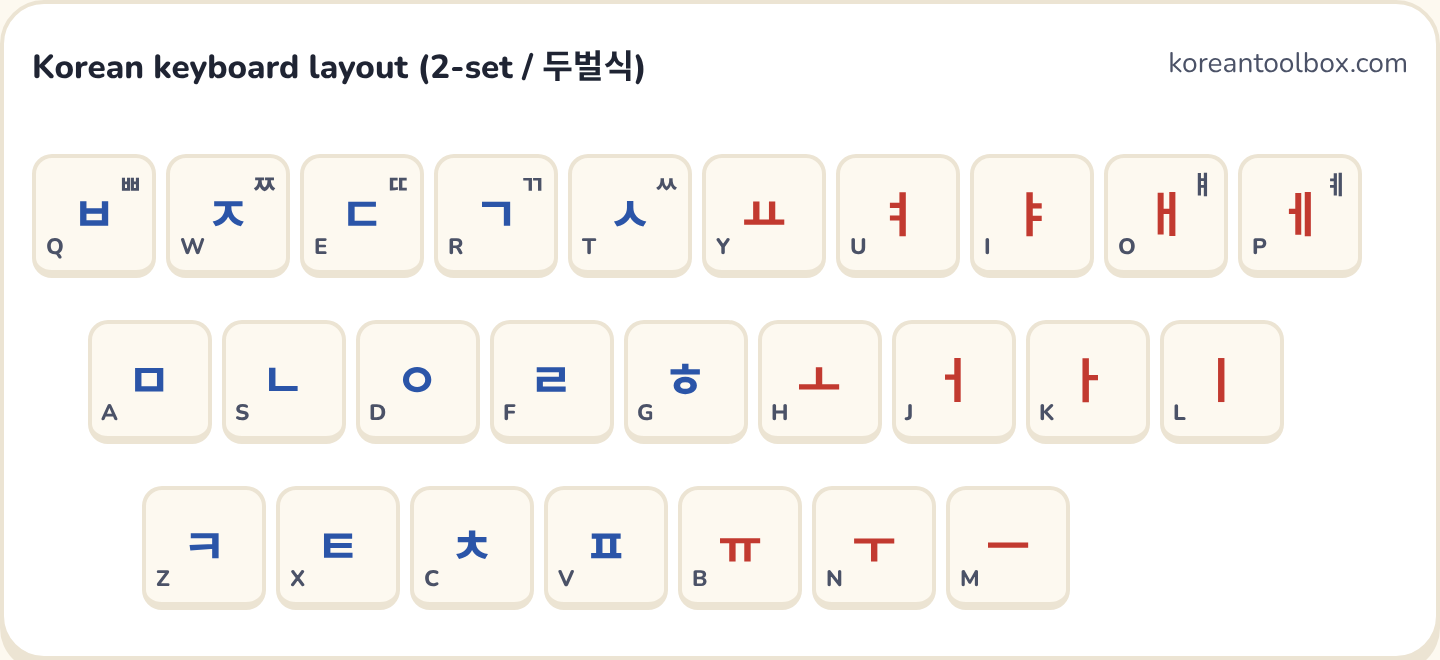
Korean keyboard layout (2-set / 두벌식)koreantoolbox.com
ㅃㅂQ
ㅉㅈW
ㄸㄷE
ㄲㄱR
ㅆㅅT
ㅛY
ㅕU
ㅑI
ㅒㅐO
ㅖㅔP
ㅁA
ㄴS
ㅇD
ㄹF
ㅎG
ㅗH
ㅓJ
ㅏK
ㅣL
ㅋZ
ㅌX
ㅊC
ㅍV
ㅠB
ㅜN
ㅡM

Download the chart (PNG)

How to learn the layout fast

Do not try to memorise all 33 keys at once. Start with the home row: your left hand rests on ㅁ ㄴ ㅇ ㄹ and your right hand on ㅓ ㅏ ㅣ. That already lets you type words like 나 (I), 어머니 (mother) and 마리 (counter for animals). Then add the top row, and the bottom row last.

Korean typing builds syllables for you. Type ㅎ ㅏ ㄴ and the keyboard shows 한; you never type a block as one key. If you get stuck, try our online Korean keyboard, which shows every key on screen, then speed up with the Hangul Rain typing game and the typing test.

Questions

Is there a Korean keyboard to download?

You do not need one. Windows, Mac, iPhone, iPad and Android all include a free Korean keyboard; you only have to turn it on in your settings. Be careful with "Korean keyboard" apps and downloads from unknown sites, which can carry ads or malware.

Which Korean keyboard layout should I choose?

Choose the 2-set layout, called 두벌식 (dubeolsik). It is the national standard in Korea and the one on every Korean computer. On phones it may be called Standard, QWERTY or 2-Bulsik.

Why does my keyboard still type English after I picked Korean?

On Windows, Korean mode can be in English-letter mode. Press the Right Alt key (the 한/영 key on Korean keyboards) to toggle to Hangul. The indicator near the clock changes from A to 가.

Do I need Korean stickers on my keyboard?

No. Most learners memorise the layout in a week or two by looking at a chart. Print the layout chart on this page and keep it next to your keyboard, or practise with our typing game.

Can I type Korean without installing anything?

Yes. Use our online Korean keyboard: click or type the letters and it builds the syllables for you, then copy the text anywhere.